



Photo to Line Drawing
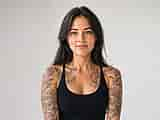
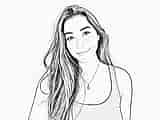
Convert any photo into a clean line drawing in seconds. Upload a portrait, object, or scene and get crisp line art that keeps the shapes and details that matter. Powered by OpenArt's best-in-class AI image models, with control over line style, thickness, and finish.
 Add an image Or drag and drop here · JPEG, PNG, WEBP, HEICJPEG, PNG, WEBP, HEIC
Explore More Trending Templates
Explore a mix of ideas, styles, and possibilities to get you started.




Frequently Asked Questions
Upload your photo to OpenArt and describe the line-art style you want: sketch, contour, or technical. Adjust detail level and output resolution, then generate.
JPEG, PNG, WEBP, and GIF up to 20 MB. The output is a high-resolution image you can download and use right away.
Yes. Images you generate are yours to use in commercial projects: print, digital, and client work.
Yes. Describe the level of detail in your prompt: simple outlines, hatched shading, or fine cross-contours. The AI interprets your instruction and renders it.
You get free credits to start. Each generation uses credits. Paid plans give you more renders and higher resolution outputs.
Start with a high-contrast photo. In your prompt, specify the style: pen sketch, vector outline, or manga line art. Mention if you want the background removed or simplified.